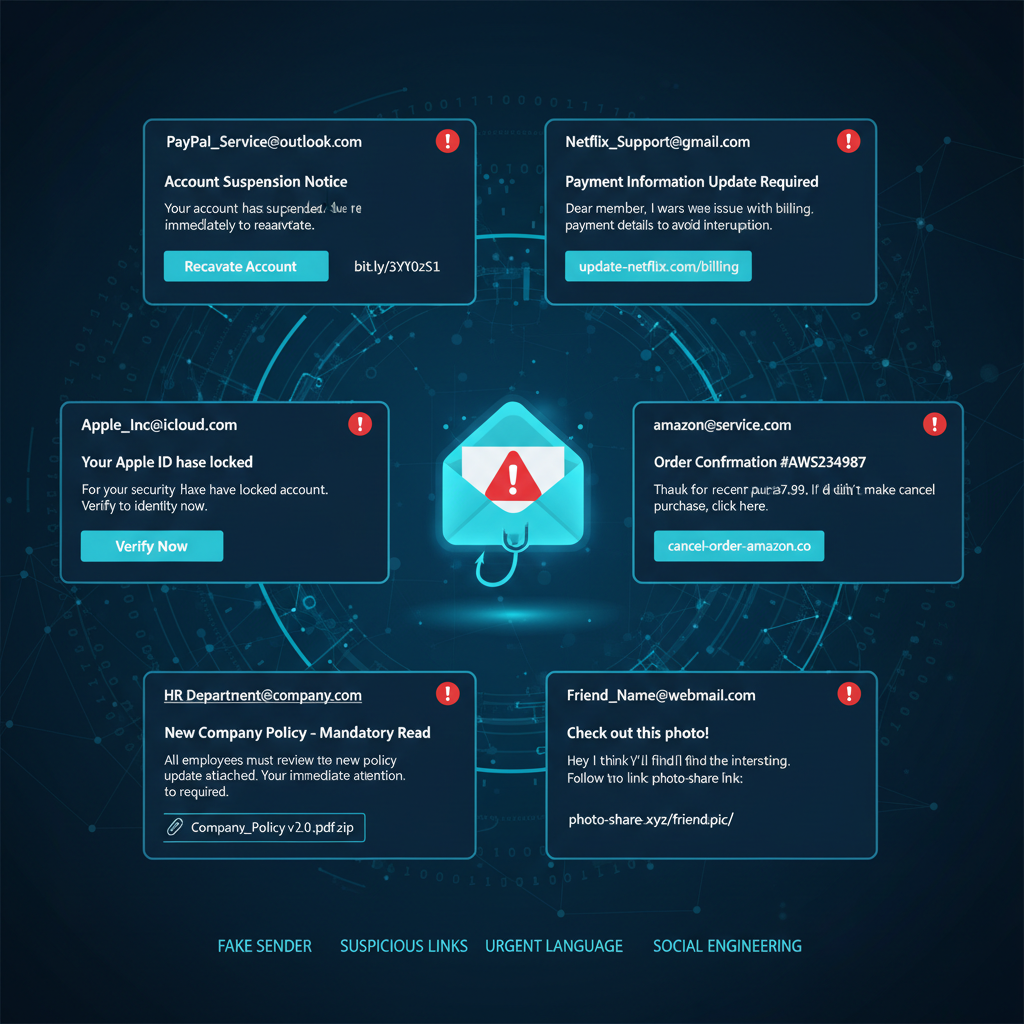
25 Phishing Email Examples Every Employee Should Recognise
These phishing email examples show the techniques attackers use to exploit people rather than technology. Defending against phishing starts with recognising what these emails look like, and reporting them in one click into the global intelligence network.
25 Real Phishing Email Types and Examples
Each example below reflects real phishing attack techniques used against employees and organisations.
Microsoft 365 Password Expiry Scam
Subject: "Your password expires today"
- Urgency
- Login request
- Unfamiliar link
- Generic greeting
Fake Invoice Email
Subject: "Outstanding Invoice Attached"
- Unexpected attachment
- Pressure to pay
- Unknown supplier
CEO Impersonation
Subject: "Need your help urgently"
- Unusual request
- Executive impersonation
- Urgency
HR Benefits Update
Subject: "Important Employee Benefits Changes"
- Credential harvesting
- Suspicious links
- Unexpected action request
Parcel Delivery Scam
Subject: "Delivery Attempt Failed"
- Fake courier branding
- Suspicious tracking links
- Personal information requests
Banking Verification Email
Subject: "Verify Your Account Details"
- Requests financial information
- Login prompts
- Spoofed domains
IT Support Password Reset
Subject: "Action Required: Reset Your Password"
- Fake IT branding
- Credential harvesting
- Urgency
Shared Document Notification
Subject: "James Smith shared a file with you"
- Fake OneDrive/SharePoint link
- Impersonating colleague
- Login prompt
Multi-Factor Authentication Prompt
Subject: "Unusual Sign-In Detected"
- MFA fatigue attack
- Fake security alert
- Urgency
Supplier Payment Change Request
Subject: "Updated Bank Account Details"
- Business email compromise
- Impersonating supplier
- Financial fraud
HMRC Tax Refund Scam
Subject: "You Have a Tax Refund Pending"
- Government impersonation
- Financial bait
- Credential harvesting
LinkedIn Connection Request
Subject: "You have a new connection request"
- Fake social platform branding
- Credential theft
- Phishing link
QR Code Phishing Email
Subject: "Scan to Verify Your Account"
- QR code bypasses email filters
- Redirects to fake login page
- Mobile-targeted attack
Payroll Update Request
Subject: "Urgent: Update Your Direct Debit Details"
- HR impersonation
- Financial fraud
- Urgency
Microsoft Teams Message Alert
Subject: "You Have a Missed Teams Message"
- Fake Teams notification
- Credential harvesting
- Corporate impersonation
Zoom Meeting Invitation
Subject: "You've Been Invited to a Zoom Meeting"
- Fake meeting platform link
- Malware delivery
- Credential theft
Charity Donation Scam
Subject: "Help Us, Emergency Appeal"
- Emotional manipulation
- Fake charity branding
- Payment fraud
Adobe Sign Document Request
Subject: "Please Sign This Document"
- Impersonating Adobe
- Malicious attachment
- Fake e-signature request
Company Policy Update
Subject: "Important: Updated Company Policy"
- Internal impersonation
- Credential harvesting
- Fake attachment
Prize or Reward Notification
Subject: "You've Won a Prize!"
- Too good to be true
- Personal information request
- Payment required
Expired Subscription Alert
Subject: "Your Subscription Has Expired"
- Fake software branding
- Payment fraud
- Urgency
Coronavirus / Health Scam
Subject: "Important Health Update for Employees"
- Exploits current events
- Malicious links
- Impersonates health authority
Cloud Storage Full Warning
Subject: "Your OneDrive Is Almost Full"
- Microsoft impersonation
- Credential theft
- Urgency
Legal Threat Email
Subject: "Notice of Legal Action"
- Fear-based manipulation
- Credential harvesting
- Impersonating legal authority
IT Equipment Order Confirmation
Subject: "Your Order Has Been Placed"
- Fake confirmation email
- Malicious links
- Financial confusion tactic
Microsoft 365 Phishing Examples
Microsoft 365 remains one of the most frequently impersonated enterprise platforms because compromised credentials provide access to email, collaboration tools, cloud storage and business applications.
Outlook
Password expiry and sign-in alerts targeting Outlook inboxes.
OneDrive
Fake file-sharing links impersonating OneDrive document access.
SharePoint
Spoofed collaboration links mimicking SharePoint document portals.
Microsoft Teams
Missed-message notifications harvesting Teams credentials.
Microsoft Authenticator
MFA fatigue and verification prompts targeting Authenticator approvals.
Microsoft Entra ID
Account-recovery and conditional access scams targeting Entra ID identities.
Real-World Phishing Examples: Annotated Screenshots
The following examples show real phishing attacks captured from active campaigns. Each screenshot is annotated with the tactic, threat type and the security email gateway (SEG) it bypassed.
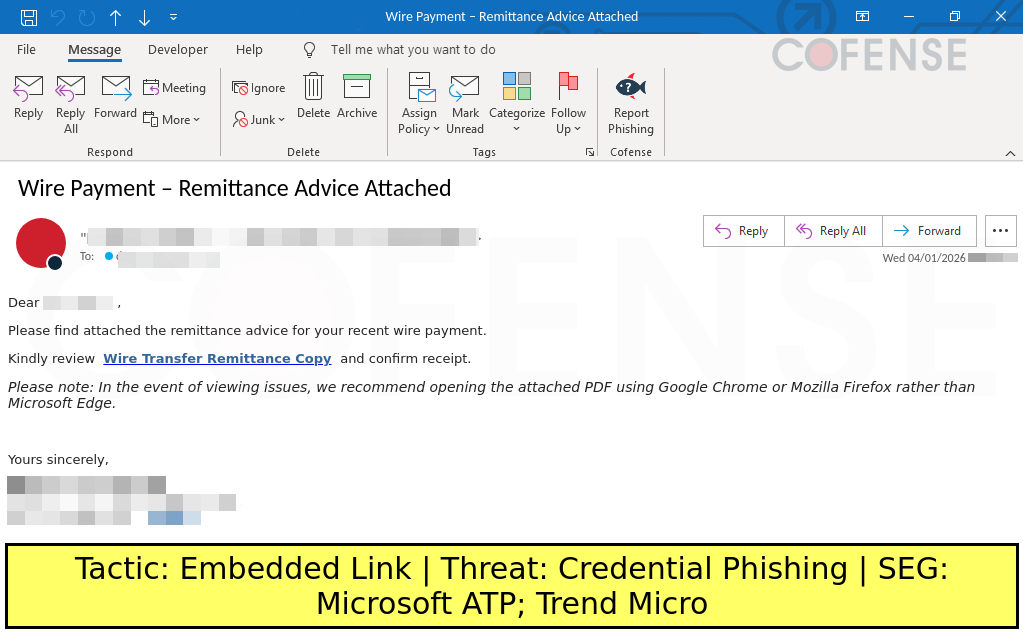
Wire Payment Remittance Advice
A finance-themed phishing email impersonating a remittance advice notification. The embedded link directs recipients to a credential harvesting page disguised as a document viewer.
Why this attack works
Exploits the routine nature of remittance advice emails. Finance teams handle these daily, making the lure feel familiar. The instruction to use Chrome or Firefox instead of Edge adds false urgency and steers victims away from browser-based protections.
Common warning signs
Generic greeting, blurred sender address, hyperlink styled as a document name, and an unusual instruction to avoid Microsoft Edge. Legitimate remittance emails rarely ask you to switch browsers.
Recommended response
Do not click any links. Verify the payment directly with your finance contact using a known phone number. Report the email using one-click phishing reporting so security teams can investigate and remove it across all mailboxes.
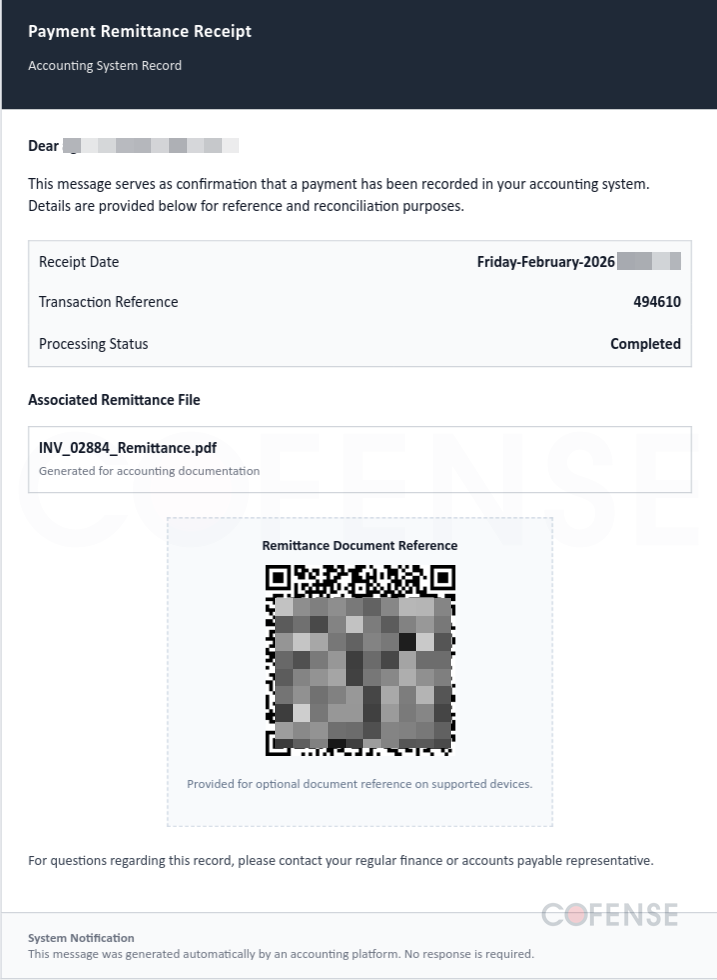
Payment Remittance Receipt with QR Code
A professional-looking payment receipt that embeds a QR code instead of a traditional link. QR codes bypass most email security filters because the destination URL is hidden inside the image.
Why this attack works
QR codes bypass email security filters because the malicious URL is embedded in an image, not in the email body text. The professional document layout, table structure and file attachment details build false legitimacy.
Common warning signs
QR code in an email where a link would suffice, generic receipt date formatting, and a vague instruction to scan for document reference. Legitimate payment receipts rarely require QR code scanning.
Recommended response
Never scan QR codes from unexpected emails. If you have already scanned, do not enter credentials on the resulting page. Report the email immediately so security teams can block the associated domains.
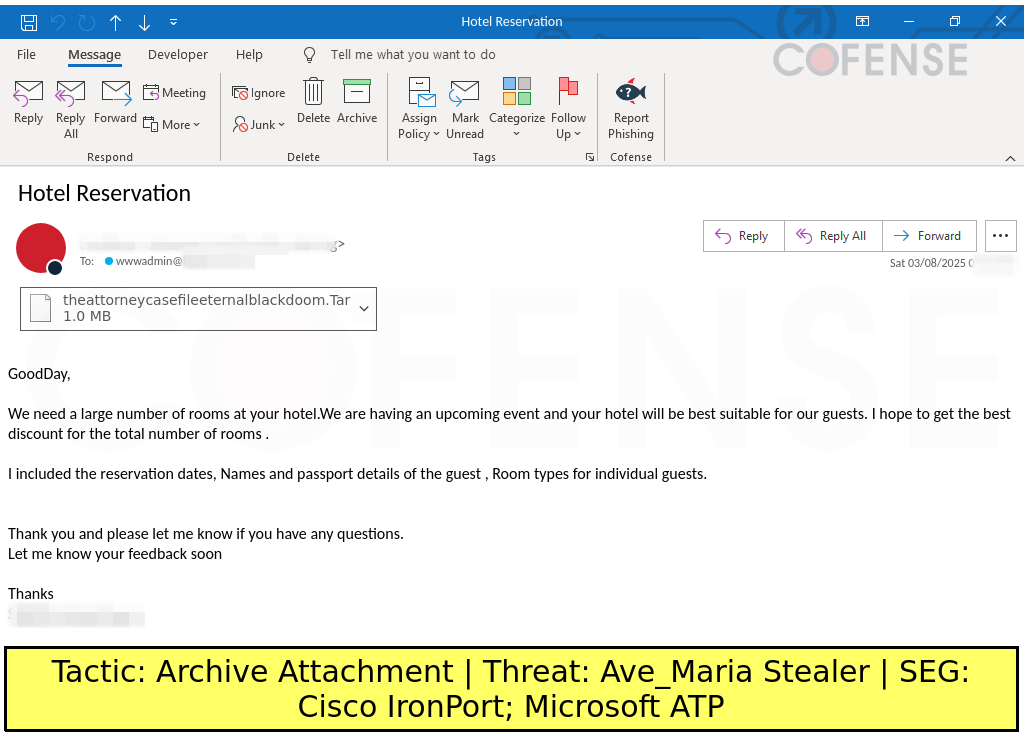
Hotel Reservation with Malicious Archive
A hospitality-themed phishing email delivering malware through an archive attachment. The .Tar file contains a trojan (Ave_Maria Stealer) designed to steal credentials and establish remote access.
Why this attack works
Exploits the hospitality industry's routine of receiving booking enquiries with attachments. The unusual file extension (.Tar) is overlooked by recipients unfamiliar with archive formats. The generic greeting and vague event details avoid personalisation errors.
Common warning signs
Unexpected attachment with an unfamiliar file extension (.Tar), generic salutation, vague booking details with no specific dates, and a sender address that does not match a legitimate hotel domain.
Recommended response
Do not open the attachment. Delete the email and report it immediately. If already opened, disconnect the device from the network and contact your IT security team for incident response and malware removal.
Proposal Invitation with Malicious Link
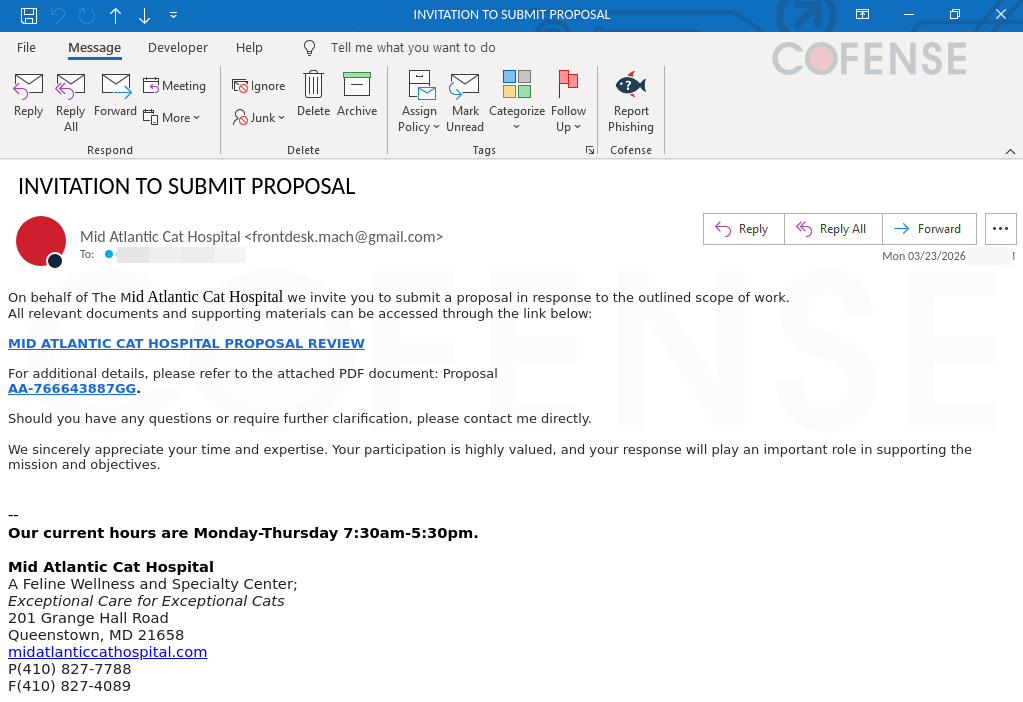
A business proposal invitation that uses a legitimate-looking sender display name but a Gmail address. The primary link directs recipients to a credential harvesting page disguised as a proposal review portal.
Why this attack works
Exploits professional courtesy and the desire to respond to business opportunities. The legitimate-looking signature block with real business details builds trust. The Gmail address is the critical red flag that the sender is not who they claim to be.
Common warning signs
Display name does not match the email domain (Gmail instead of a business domain), hyperlink text does not match the URL destination, and the request to access documents through an external link rather than an attachment.
Recommended response
Do not click the link. Verify the sender by searching for the business independently. Report the email using one-click reporting so security teams can investigate the link and block the harvesting domain.
Fake Google Meet Download Page
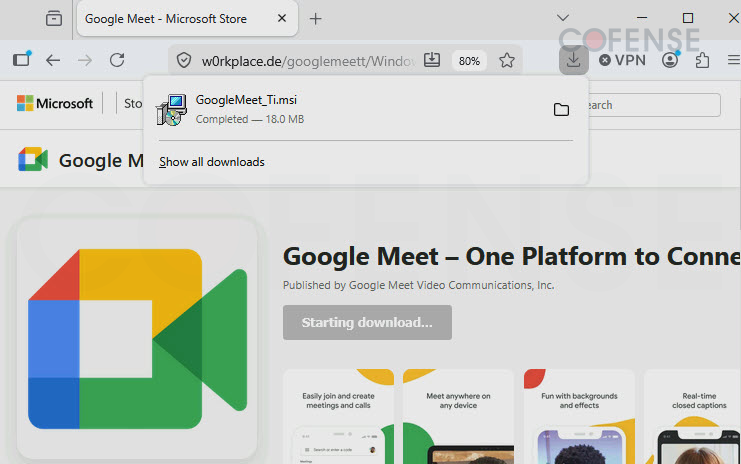
A browser-based phishing attack that masquerades as the Microsoft Store. The lookalike URL and deceptive download button trick users into downloading a malicious .msi file disguised as Google Meet.
Why this attack works
Exploits user trust in familiar platforms like the Microsoft Store. By using a lookalike URL and a deceptive download button, attackers trick users into downloading a malicious .msi file disguised as legitimate software.
Common warning signs
Suspicious URL (w0rkplace.de instead of microsoft.com), unexpected Starting download prompt for applications that should be installed through official app stores, and a domain that does not match the brand.
Recommended response
Do not execute or open the downloaded file. Delete the file immediately, clear browser downloads, and report the suspicious site to your security team or IT department.
According to the Verizon 2024 Data Breach Investigations Report, phishing remained one of the top initial access methods used by attackers, featuring in 14% of confirmed breaches.
Modern Phishing Attack Chains
Modern phishing attacks frequently involve multi-stage attack chains that go far beyond a single malicious link.
Attacks No Longer Stop at the Email Link
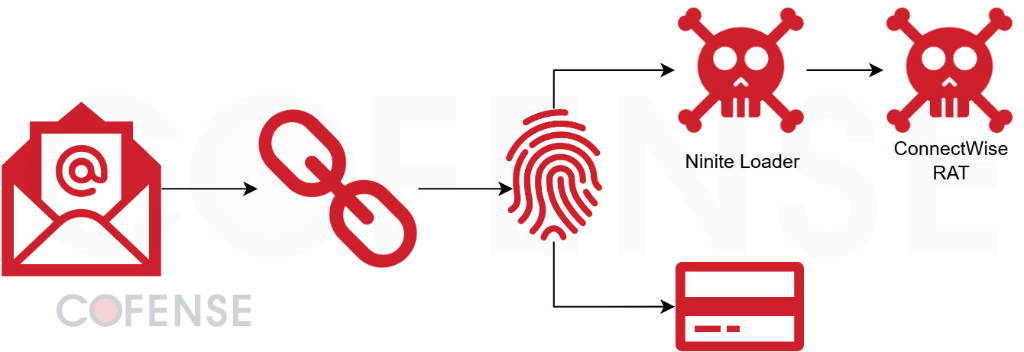
Today's phishing campaigns use sophisticated delivery chains that combine browser fingerprinting, CAPTCHA evasion, device fingerprinting, session token theft and MFA interception. Attackers frequently combine multiple techniques after the initial phishing email to bypass security controls and maintain access.
A Typical Modern Attack Chain
Each stage builds on the last. Blocking the attack at any point in the chain, from the initial email to the final remote access trojan, prevents the full compromise.
Common Phishing Email Red Flags and Warning Signs
Modern phishing attacks exploit predictable human responses.
Urgency
Attackers want quick decisions before victims have time to think.
Fear
Threats of account suspension or financial loss.
Curiosity
Tempting attachments or links designed to prompt clicks.
Authority
Messages appearing to come from management or trusted institutions.
Trust Exploitation
Impersonation of suppliers, colleagues or known brands.
Why Reporting Matters: One Email Can Reveal a Campaign
Recognising phishing emails is only the first step. When employees report suspicious messages quickly, a single email can reveal multiple recipients, shared infrastructure and wider campaign activity across the organisation.
Identify Threats Earlier
Employees frequently spot phishing attacks before automated systems detect them.
Discover Wider Campaigns
One report can surface related threats, shared infrastructure and attack clustering.
Strengthen Campaign Intelligence
Real-world phishing intelligence derived from millions of user-reported emails helps identify emerging phishing campaigns before they affect additional users across the organisation.
Reduce Response Times
Faster reporting means faster investigation, triage and remediation.
The Modern Phishing Investigation Workflow
A connected pathway from employee report to organisation protected.
- Step 1
Employee Reports Email
- Step 2
AI Analysis
- Step 3
Human Validation
- Step 4
Campaign Detection
- Step 5
Threat Quarantine
- Step 6
Inbox Remediation
- Step 7
Organisation Protected
The Human Firewall: Why Employees Are the Strongest Defence
Modern phishing attacks increasingly bypass traditional email filters. When users report suspicious emails quickly, attacks are detected faster, analysts gain visibility and phishing campaigns can be contained sooner.
Effective human firewall programmes combine phishing simulations, awareness training, one-click reporting, phishing response playbooks and regular testing.
What Happens After an Email Is Reported?
Modern phishing response platforms automate the process of investigating and remediating reported threats.
What Phishing Examples Reveal About Human Risk
Repeated phishing trends highlight high-risk user groups, reporting behaviour, security awareness gaps and human risk indicators. Human Risk Management helps organisations understand where phishing exposure exists and how risk changes over time.
Risk Identification
Identify high-risk user groups and behavioural trends.
Reporting Analysis
Track reporting behaviour and identify awareness gaps.
Training Planning
Target training opportunities based on real risk data.
The Future of Phishing Emails
Phishing attacks continue to evolve through artificial intelligence. Future campaigns may incorporate AI-generated emails, deepfake communications, voice phishing, QR code phishing and hyper-personalised messaging.
Emerging attack techniques
- AI-Generated Emails
- Deepfake Communications
- Voice Phishing
- QR Code Phishing
- Hyper-Personalised Messaging
- Executive Impersonation
Defence capabilities organisations need
- Campaign Intelligence
- Rapid Detection
- Campaign Visibility
- Fast Response
- Continuous Improvement
- Human Risk Management
Building a Modern Phishing Defence Strategy
Awareness remains essential, but awareness alone is no longer enough. Modern phishing defence combines faster investigations, reduced attacker dwell time, stronger reporting culture and continuous improvement.
The Phishing Defence Journey
Effective phishing defence is a continuous operational cycle, not a one-time action. Each stage strengthens the next.
Recognise
Spot the red flags in suspicious emails.
Step 2Report
Use one-click reporting to alert security teams.
Step 3Investigate
AI-powered triage clusters and prioritises threats.
Step 4Remediate
Autoquarantine and remove threats across all mailboxes.
Step 5Learn
Feed intelligence back into awareness programmes.
Step 6Improve
Simulations strengthen detection with every cycle.
Phishing Email Examples FAQs
UK Cofense Authorised Distributor
Authorised Cofense distribution for UK organisations.
Real Phishing Examples
Curated from real-world phishing campaigns and threat research.
Microsoft 365 Specialists Partners
Deep Microsoft 365 phishing defence experience.
Human Risk Experts
Specialised in reducing employee phishing risk.
Enterprise Deployment Experience
Large-scale Cofense rollout and support.
UK & European Support
Local support across the UK and Europe.